
Football playbook softwareand play designer
Build 11v11 football diagrams with routes, blocking assignments, motion and defensive coverage, animate the play in slow motion and turn it into a clean install sheet. LazyPlaymaker is a simple football playbook maker for coaches who want less setup and more football.
Free football playbook software for coaches. Save plays in your browser, export JSON backups, and optionally use cloud recovery and cross-device sync.
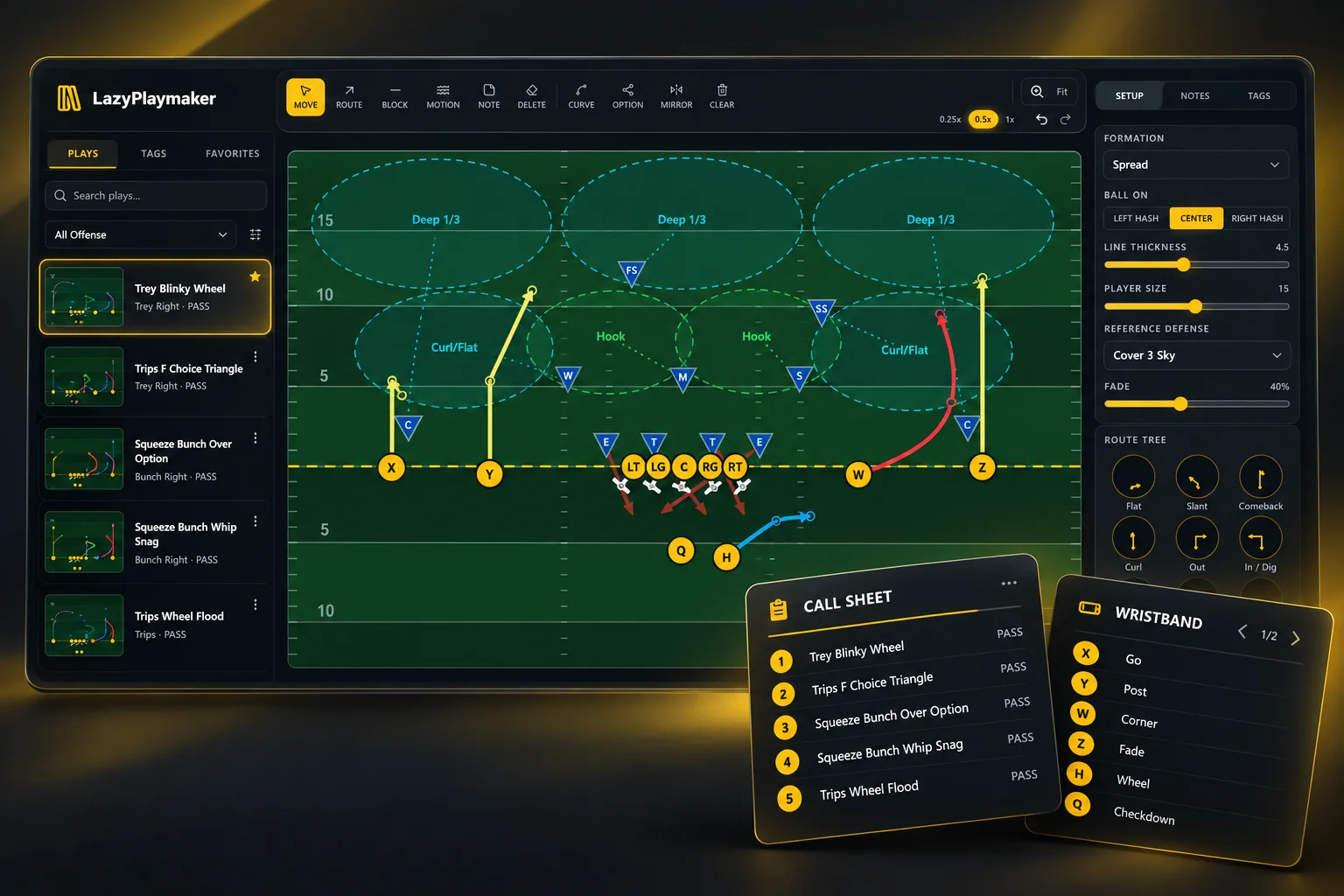
Game-day tools
Merge, wristbands and call sheets sit right next to your playbook, so what you draw here is ready for game day.
Merge
Combine an offensive play with a defensive call into one view. See matchups, leverage and responsibilities on the same field before practice.
Open MergeWristbands
Select your plays, write short call or cue text, set the wristband size in millimetres and export a printable PDF sized for the wristband.
Build wristbandsCall sheets
Organize calls into situational sections — Opening, 1st & 2nd Down, 3rd Down, Red Zone and Short Yardage by default. Add or rename situations, pick plays, add cue text and export a PDF.
Build call sheetsA football play designer built around coaching work
Diagram offense and defense, explain assignments and create material players can actually use without turning the playbook into a design project.
11v11 play designer
Set up full offense and defense with every skill player, lineman and defender on a marked field. Drag, snap and mirror alignments in seconds.
Routes, blocks & motion
Draw receiver routes, blocking assignments and pre-snap motion. Use route presets, hard cuts or curves, and option branches for reads.
Play animation
Run the play at 0.25x, 0.5x or 1x speed so players can see the timing of motion, routes, blocks and coverage drops.
Defensive coverage & blitz
Draw coverage drops and blitz paths, place zone bubbles, assign priority areas and visually connect defenders to responsibilities.
Merge offense vs defense
Combine an offensive play and a defensive call into one view to study matchups, leverage and responsibilities before practice.
Wristbands
Pick your plays, write short call or cue text, set the printable wristband size in millimetres and export a PDF sized for the wristband.
Call sheets
Organize calls into situational sections like Red Zone or 3rd Down, add short cue text and export a printable PDF call sheet.
Install sheets
Turn finished plays into clean install sheets and export them as PDF or Word documents for meetings, practice plans or player packets.
Football coaching tools, explained simply
Open a section when you need more detail. The descriptions stay out of the way while keeping each tool easy to understand.
Route drawing and route tree
Draw custom receiver routes with hard breaks or smooth curves, or start from route-tree presets such as slants, outs, posts, corners, wheels and whips. Add option branches when one concept has multiple reads.
Blocking assignments
Draw blocking paths for linemen, tight ends and backs. When several players are selected, the same blocking shape can be applied across the group to speed up repeated assignments.
Pre-snap motion and movement
Show receiver motion, backfield movement and defensive stunts before the snap, then continue into each player's post-snap assignment from the motion endpoint.
Custom formations and personnel
Start from offensive and defensive formations, adjust the alignment, save custom formations and reuse them as the starting point for new plays.
Coverage zones, drops and pressure
Build defensive calls with man responsibilities, zone areas, coverage drops and blitz paths so the diagram describes both where defenders go and what they are responsible for.
Slow-motion football play animation
Run the diagram at different speeds to make route timing, motion, blocks and defensive reactions easier to explain in a meeting or on a shared screen.
Offense-versus-defense merge
Overlay an offensive concept with a defensive call to compare spacing and matchups without redrawing either side of the play.
Printable wristbands
Select plays for the band, write short call or cue text, set the printable wristband width and height in millimetres, and export a PDF sized exactly for the wristband.
Situational call sheets
Organize calls into sections such as Opening, 1st & 2nd Down, 3rd Down, Red Zone and Short Yardage. Add or rename situations, pick plays, write short cue text and export the call sheet as a PDF.
Install sheets, backup and sync
Export install sheets as PDF or Word, keep portable JSON backups for manual restore, and optionally use verified cloud recovery points and cross-device sync with an account.
From idea to install sheet in minutes
No tutorials to binge. The simple workflow is: load, draw, run, save, print.
- 1Pick offense or defense and load a formation.
- 2Drag players into position and draw routes, blocks or responsibilities.
- 3Hit Run Play to watch the motion and timing unfold.
- 4Save the play and create an install sheet.
Built for coaches, not designers
- •Drag players and snap them to the field grid automatically.
- •Mirroring, undo/redo and route presets speed up repetitive drawings.
- •Custom formations are first-class: create, duplicate, edit and reuse your own.
- •Export and restore your entire playbook with a portable JSON backup.
- •With an account, optionally add verified cloud recovery points and cross-device sync.
Try the free football playbook software
Open the app, pick a side and draw your first play. No account required.
Open LazyPlaymaker